Stop Chunking Your CSVs: How I Built an AI That Reads Spreadsheets Like a Human
Last week, I walked into a meeting that started with what seemed like a simple question.
"We've got PDF ingestion working great. How do we solve for CSVs and spreadsheets?"
The room went quiet.
You know that silence - the one where everyone's mentally calculating how much work just landed on the table? That was it.
See, here's the thing. Chunking PDFs and text files into a RAG pipeline? That's pretty neat at this point. It's almost a solved problem. You split the document, generate embeddings, throw it into a vector store, and boom - semantic search. Tutorials everywhere. Libraries for every framework. It 'just works'.
But spreadsheets? That's where things get messy. Fast.
And the worst part? Our spreadsheets are never well-defined. Like, never. Someone uploads a beautifully formatted product catalog, great. Next file? A CSV that looks like someone sneezed into Excel. Headers in weird places. Empty rows scattered randomly. Column names that are just "Col1, Col2, Col3" because nobody bothered to label them.
If we really want to solve for agentic use-cases - and I mean really solve for them, not just demo them - we have to crack this. You can't build intelligent agents that choke every time someone uploads a CSV with an unconventional layout. So I decided to build something.
The problem is not trivial. And it calls for a non-trivial approach.
The Complexity Has to Live Somewhere
Before I dive into the solution, let me share something I keep coming back to in system design. It's a principle that's saved me from a lot of bad decisions:
You can't eliminate complexity. You can only move it..
Think about that for a second. If you want a system that's nice and easy for users - intuitive, frictionless, the kind of thing where someone just drags a file and 'it works' - you can't run away from complexity. You have to take it away from the user experience and bake it into the design layer.
In plain words: the complexity has to exist 'somewhere'. Either it sits on the user's plate - they configure settings, choose strategies, fix errors - or it sits in your system's architecture, hidden behind a simple interface.
The best products? They hide enormous complexity behind dead-simple flows.
Your iPhone doesn't ask you to arrange your apps. Google doesn't make you pick which index shard to query. These systems absorbed the complexity so you don't have to think about it. That's what I wanted for spreadsheet ingestion. User drops a file. System figures it out. Done. Easier said than done, though.
The Problem: Spreadsheets Come in All Shapes
Let me paint a picture of what "not well-defined" actually looks like in the wild.
Sometimes a user brings a clean row-based CSV:
ID	Name		City				Grade
1	Kiana	Suzhou			3.7
2	Joshua	Santa Clarita		3.2
Beautiful. Headers in row 1. Each row is a student. Each student is a complete entity. You could almost chunk this blindfolded.
Other times, it's column-based:
Attribute	Model A		Model B		Model
Engine		2.0LTurbo	2.2L Diesel	1.5L Hybrid
Power		200 HP		185 HP		120 HP
Price		$45,000		$42,000		$38,000
Wait, now the 'columns' are the entities, not the rows. The first column is just attribute labels. If you chunk by rows, you'll create documents like "Engine: 2.0L Turbo, 2.2L Diesel, 2.2L Diesel", which is... useless (and you would find it funny when they will call as your agent is 'hallucinating' :P)
And sometimes? Both row AND column headers matter:
		NYC		LA		Chicago
NYC		0		2789		790
LA		2789		0		2015
Chicago	790		2015		0
This is a distance matrix. Neither row-based nor column-based. The 'cell' is the meaningful unit. "NYC to LA: 2,789 miles" - that's what someone would search for.
And then there's garbage, only to name a few:
Empty files
Files with only headers, no data
Pivot tables with summary rows that mean nothing in isolation
Random data dumps with no discernible structure
Index these and you're adding noise, not signal. A naive chunking strategy will fail on at least three of these scenarios. And users will bring all of them.
The Idea: AI Coaching AI
I stared at this problem for a while. Tried a few rule-based approaches. "If header is in row 1, then ROW strategy." "If first column looks like labels, then COLUMN strategy."
You can imagine how well that went. Edge cases everywhere. The rules kept growing, becoming this unmaintainable spaghetti of if-else conditions. Then it hit me.
Why am I writing rules for something that requires 'understanding'?
A human looking at a spreadsheet doesn't follow a decision tree. They 'look' at it. They get a feel for the structure. They understand what the data represents. And then they decide how to process it. That's not rules. That's reasoning.
So here's the approach I landed on:
Use AI to coach AI on how to chunk
The spreadsheet first goes to an LLM with high reasoning capabilities. Not to generate documents - that comes later. Just to *understand* what's going on. The AI reads the file like a human would: - What are the headers? - What does each row represent? - What does each column represent? - Where are the entities? - How would someone search this data? And then it makes a decision. Row-based? Column-based? Cell-based?
Or - and this is important - should we reject this file entirely? Some files will do more harm than good if you index them. Pivot table summaries. Files with two rows. CSVs that are just column headers with no data. Index these and you're adding noise to your search results. Knowing when to say "no" is a feature, not a failure.
The Chain of Thought
Here's how the reasoning actually works. I give the AI a structured framework to think through:
Step 1: File Structure Analysis - Read this file. Tell me what you see. How many rows? Columns? Multiple sheets? Where are the headers located? Is there enough data here to even bother indexing?" If there's less than 2 data rows, stop right there. REJECT. Move on.
Step 2: Header Pattern Recognition - Where are the labels? Are they in row 1, describing each column? Or in column A, describing each row? Or both - like a distance matrix?" This is where you start to see the shape of the data.
Step 3: Data Flow Analysis - How does information flow in this file? Down the columns - each column is a thing? Or across the rows - each row is a thing? Student lists flow by row. Product spec sheets flow by column. Distance matrices flow by cell intersection.
Step 4: Entity Identification - What are the actual entities in this data? If it's a student list, each student is an entity. If it's a car comparison, each car model is an entity."* This is the heart of it. Once you know what the entities are, you know how to chunk.
Step 5: Search Usefulness Test - Imagine someone searching this data after it's indexed. What would they search for? Which strategy produces useful, findable, self-contained documents? If the answer is "row documents would be useless" - don't use rows.
At the end, the AI outputs a structured decision:
{
    "strategy": "ROW",
    "confidence": 0.92,
    "reasoning": "Each row represents a complete student with demographics and grades. Users would search by student name or filter by attributes like city or grade."
}
High confidence means clear pattern. Lower confidence means ambiguous structure — proceed with caution, maybe flag for human review.
Separating Thinking from Doing
Here's something I learned the hard way:
Don't make the LLM do the grunt work.
Early versions of this system tried to have the LLM generate all the documents. "Here's a 5,000-row CSV, please output 5,000 JSON documents." Terrible idea. You hit output token limits. The model truncates or hallucinates. It costs a fortune in API calls.
The fix was obvious in hindsight: -
LLM does the thinking. It analyzes the file, understand the structure, choose a strategy -
Python does the work. Loops through the rows/columns, generate documents programmatically
This is where I leveraged the Code Interpreter on Azure AI Foundry. It's perfect for this workflow:
1. The LLM can actually *open* the uploaded file — not just see metadata, but read the actual data
2. It runs in a sandbox environment — isolated, secure
3. It can execute Python to analyze, compute statistics, and reason about the content
The reasoning happens inside the Code Interpreter. The generation happens outside. Best of both worlds. And finally - a simple orchestrator pushes the generated document into your search index - I used Azure AI Search here.
Let's have a look at it
Here is a simple app which I have built for the demonstration:

In the green box: we have a plain drag and drop functionality
Yellow box shows the ingestion job results - which strategy was chosen by the AI and how many documents were generated
Blue box shows the index status: how many documents are currently indexed
Orange box is a plain conversational agent which has been configured with this search module as RAG data source
Example# 1: Students Dataset (Row based)

This is a plain row based dataset sourced from https://github.com/datablist/sample-csv-files for demonstration purposes

The system ingests this spreadsheet
AI picked up right strategy for ingesting this dataset which is row based ingestion
Python code generated 307 documents - 1 for each row which were pushed to index which also shows 307 documents
The AI agent plugged with this RAG store answered the question well
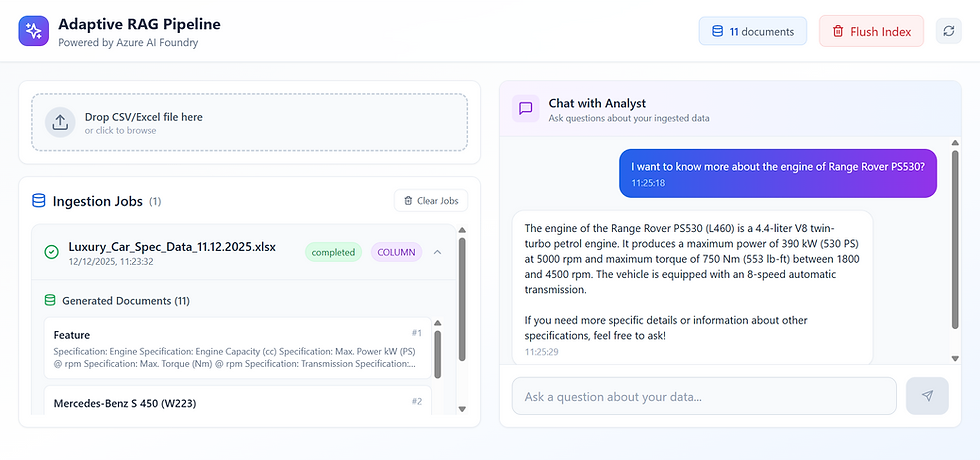
Example# 2: Luxury Cars Dataset (Column based)

This is a synthetic dataset showcasing some luxury (dream) cars and their respective specifications
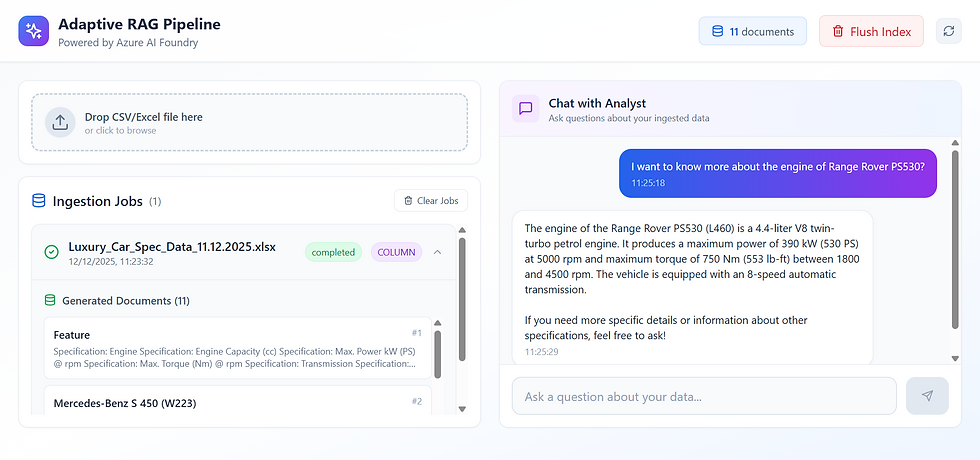
Again, the system ingests this spreadsheet
AI picked up right strategy for ingesting this dataset which is row based ingestion
Python code generated 307 documents - 1 for each row which were pushed to index which also shows 307 documents
The AI agent plugged with this RAG store answered the question well
Example# 3: Distance Matrix (Cell based)

This is a synthetic dataset showcasing some dummy distance values between different cities (a tough one for RAG use cases)

The AI nailed it - it picked up 'Cell' as a document strategy (not visible on the screen though :P)
Generated 10x10 documents, each cell as a document, indexing 100 distinct documents
The AI agent responds pretty well to a generic question which involves a relative query - suited well for the dataset
You could have seen either of these implementations working pretty well but the toughest part is to make it work all together. This is where the complexity gets abstracted away from a user and baked into the design.
In this case, we were able to abstract it from the user and let AI shine putting its reasoning capabilities at the forefront. What do you say?
The Bottom Line
Here's what that meeting last week reminded me: Solving for spreadsheets isn't about finding a smarter chunking algorithm. It's about recognizing that 'tabular data has structure', and building a system intelligent enough to "see" that structure and respect it.
The complexity doesn't go away. You can't wish it out of existence. But you can move it - from the user's problem to your system's architecture. And when you get that right? The user just drags, drops, and searches. As intuitive as they'd like. As reliable as they'd expect.
All the hard work happens where they'll never see it. That's good design.


Comments